Changes in v0.5.1:
- Reaper now accepts more than one audio
in/out.
- There are now two "edit modes" : 'cables'
and 'value':
- In 'cable' mode: dragging a pin will
create a cable (you can still use the
mousewheel to change a parameter value).
- In 'value' mode: dragging a parameter
pin will change its value (fine-tune with
ctrl, alt or shift, each modifier key
multiply the precision by 10). Dragging an
audio or MIDI pin will create a cable.
- You can select a mode with the shortcut
keys 'E' and 'V'.
- New shortcuts:
- To show the plugin editor : double click
the plugin title, or press 'E'.
- Toggle the learning mode on/off with
'L'.
Changes in v0.5.0:
- The panel content was sometime deleted after
moving or copying programs.
- The optimizer was erroneously deleting some
render nodes: some plugins ceased to work after
a program change.
- The "render map" is only updated when
something change.
- Kontakt was hanging when loading a file and
no audio interface were opened.
- Program changes were not responding when the
plugin was suspended by a host.
Changes in v0.4.9:
- Added a handle to resize the window when
VstBoard is loaded as a plugin.
- Fixed custom colors when loaded as a plugin.
- Fixed the Shell plugins loader.
Changes in v0.4.8:
- There are now two plugin DLLs: instrument
and effect.
- Fixed a bug preventing a host to restore the
saved state of VstBoard.
- Fixed some compatibility issues with Renoise
and EnergyXT.
- Audio buffers are not clipped at 0db
anymore.
Changes in v0.4.7:
- Fix for the last fix.
- Show all parameters if the plugin has no
editor.
Changes in v0.4.6:
- Vcredist included.
- DLL and exe are not packed with mpress
anymore (to avoid some antivirus warnings).
- Better handling of "dynamically assigned
parameters" (for Guitar Rig, Kontakt,...).
- Windows XP compatible.
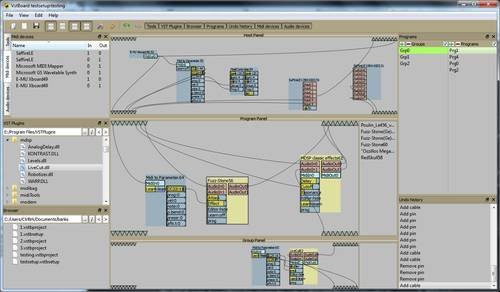
VstBoard is a free,
open source, VST host and plug-in. Its main purpose
is to allow fast switching between setups and was
primarily designed to be used as a guitar multi-fx.
Visit:
CtrlBrk