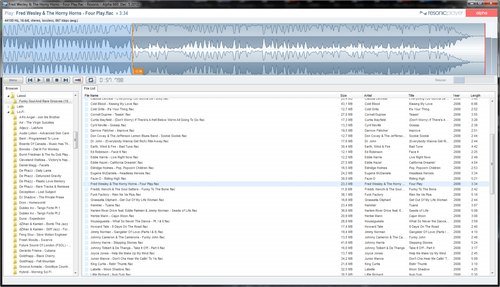
This release improves performance
and stability, fixes analyzer scales, and introduces
a couple of new features, including columns
customization.
-
Waveform scanning now about
twice as fast, also for multi-channel files.
-
Meta data listing fixed and now
also several times faster, especially for files
with incomplete tags.
-
Introducing the notification and
status bar, which replaces most of the annoying
message popups. It sits at the bottom of the
main window and shows various kinds of messages
in the colors green, yellow, orange, and red.
-
Number of files in current
folder and total size now shown in status bar.
-
Customizable columns
(right-click file list header). Column settings,
sort column, and direction are all saved and
restored.
-
Option to avoid the horizontal
scrollbar (right-click file list header), which
is enabled by default. This feature will try to
maximize the main column, and right-align all
other columns so that the scrollbar is never
shown. If it's not possible to avoid the
scrollbar a message is shown.
-
Sort column and direction
remembered when changing folders.
-
Sort column background now
highlighted.
-
It's now possible to sort by
columns that contain information which is not
immediately available, like tags or audio
properties. Depending on the sort column Resonic
might sort the file list again when all the
required information is available.
-
It's now possible to sort by the
little colored squares that describe the kind of
content in the audio file, i.e. blue for
lossless, orange for lossy, or green for music.
Just click the column header to sort by the
colored squares.
-
Full multi-monitor support for
any combination of screen sizes and arrangements
for saving and restoring window position and
size. If the window is more than half of its
width or height out of either side of the
multi-monitor setup it is automatically
recovered. With Save window position enabled you
can now safely move Resonic, for example, to a
second screen, maximize it there, and have it
saved and restored there. Resonic can now also
span multiple monitors.
-
Volume presets (right-click
volume bar).
-
Save and restore user volume
(right-click volume bar).
-
Added Explore and select folder
to context menu in browser (suggested:PHM).
-
File listing speed improved on
Windows 8, especially for folders containing
thousands of audio files.
-
Mouse cursor can now
automatically be hidden when on visualization
(see Menu | Visualization).
-
New shortcut: NUMPAD+1 jumps to
the beginning of the file.
-
New shortcut: NUMPAD+2 jumps to
the middle of the file.
-