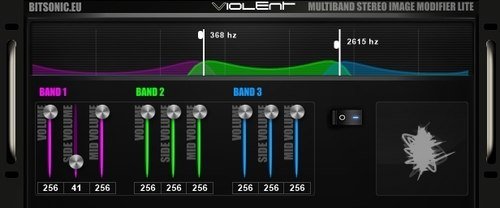
Using Multiband Stereo Image
Modifier Lite you can freely change the sense of
space, in 3 different frequency-ranges. Mid/Side
mode optimalizes the audio sign. You can change the
volume or stereo image with the Mid/Side volume
functions.
Graphic frequency range
handler interface: It can manage 3
different frequency ranges. The overlay of the
different ranges can be changed with the vertical
white lines. The ranges are colour-coded. When used,
the vectorscope shows the stereo images of the
ranges, and therefore you can see on the graphic
display if the sense of space is correct.
Side volume: Adds
to the sense of space. In middle-state there is no
change. Pushing the slider up the sign changes to
mono, pushing it down adds to the sense of space.
Deafult value is 128.
Mid volume: Changes
the volume of the mid-channel Useful function,
because it lowers the middle sounds’volume – like
the kickdrum or the vocal zone. Default volume is
256.
Volume: All 3
frequency-ranges’ volume can be changed separately.
Modifier on/off: In
off mode the switch turns off all the effects in the
program.
Band buttons: These
buttons are used to turn on and off the different
frequency-ranges. When turned off, it turns off the
whole stream of signs from the ranges – meaning that
both effects and the original sign will be turned
off. In this state the frequency-ranges’ interface
can’t be seen, therefore it’s easy to tell which
range is on or off.
Visit:
bitsonic.eu/stereoimagerlite