Loads of new stuff in this release.
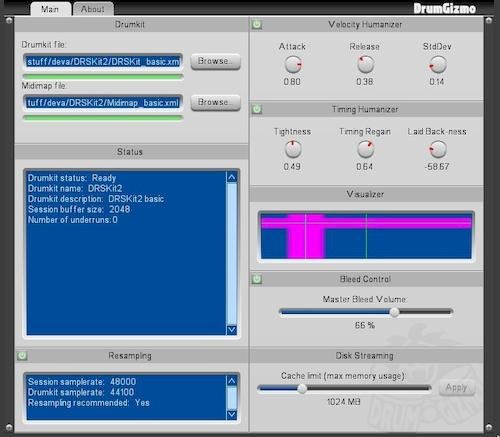
Most prominent is the new timing humanizer and the
bleed control! The timing humanizer works in
addition to the velocity humanizer. Where the
velocity humanizer adjusts the velocity of incoming
midi hits, the timing humanizer does the same thing
but instead moves them back and forth in time. This
all helps to achieve a less machine-sounding output.
To help with the understanding of the humanizing
features, we've also added a “visualizer” which will
mirror the settings you choose for a better
understanding. This is the first iteration of the
visualizer, so feedback is very welcome.
So what else? Oh yes, “bleed
control”! And yep, it does exactly what you expect.
If you want a dry sounding kit, turn that slider
aaaall the way down. But if you want all of the
ambience in there, turn it aaaall the way up. Bleed
is when a hit on any drum is also picked up by mics
that aren't the “primary” mic of that specific drum.
For some genres bleed is unwanted. For others, not
so much. And now YOU are in control.
A note on the bleed control:
Currently only the newly updated CrocellKit v1.1
supports this. We still need to update the rest of
the kits before it will work for those. So keep an
eye out for that.
DrumGizmo is an open source,
multichannel, multilayered, cross-platform drum
plugin and stand-alone application. It enables you
to compose drums in midi and mix them with a
multichannel approach. It is comparable to that of
mixing a real drumkit that has been recorded with a
multimic setup.
Visit:
drumgizmo.org/wiki/doku /
kvraudio.com/forum